Convert Hindi and Indian Bank Statements to Excel
India’s 560+ million bank accounts generate statements with unique challenges: lakh/crore number formatting, password-protected PDFs, Hindi/Devanagari text, and UPI/NEFT/IMPS transaction codes. Here’s how to convert them accurately.
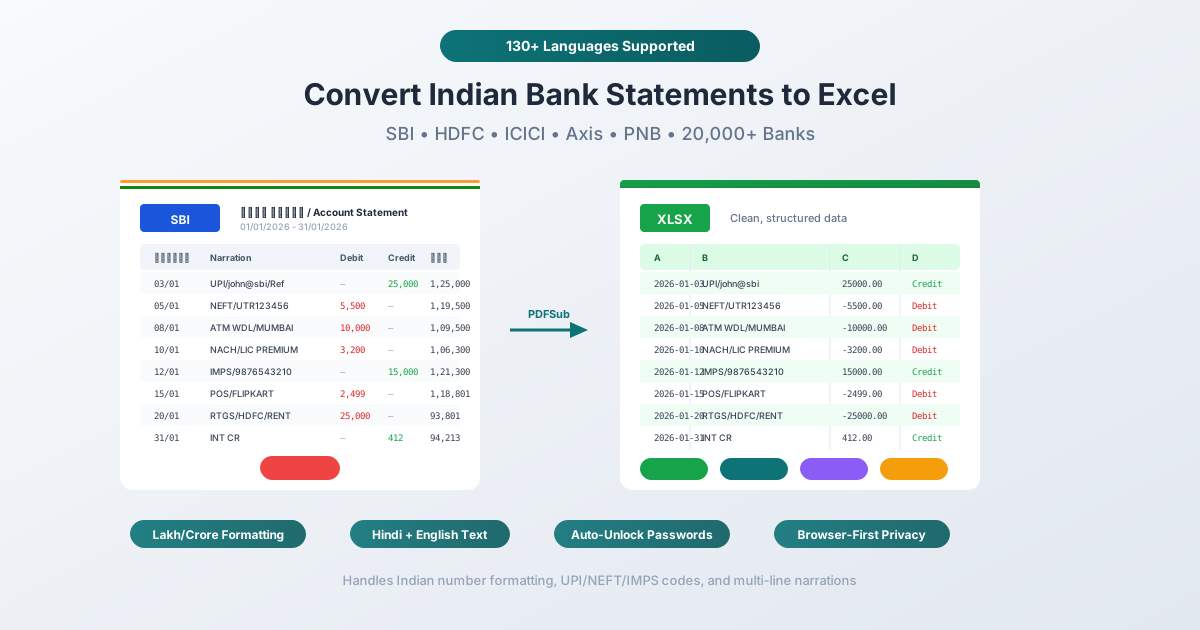
India has over 560 million bank accounts opened under Jan Dhan Yojana alone, with 295+ million digital banking users and 685 banks live on UPI processing 21.6 billion transactions per month. Nearly every one of these banks issues PDF statements - each with its own layout, password format, date convention, and transaction code system.
Converting Indian bank statements to Excel is harder than it looks. The lakh/crore number system places commas differently from Western formatting (1,23,456.78 vs. 123,456.78). Most statements are password-protected with bank-specific combinations of Customer ID, date of birth, and account numbers. PSU banks include Hindi (Devanagari) text alongside English. And narration fields containing UPI transaction IDs and NEFT UTR numbers frequently wrap across multiple lines, breaking standard extraction tools.
This guide covers every major Indian bank's statement format, password patterns, transaction codes, and the specific challenges of converting them to Excel, CSV, or Tally-compatible formats.
Indian Bank Statement Formats
Standard Column Layout
Most Indian bank statements use this column structure:
| Column | Description |
|---|---|
| Date | Transaction date (format varies by bank) |
| Value Date | Date funds actually clear |
| Narration / Description / Particulars | Transaction details, codes, and counterparty |
| Chq/Ref No. | Cheque number or reference number |
| Withdrawal / Debit | Amount debited |
| Deposit / Credit | Amount credited |
| Closing Balance | Running balance after each transaction |
Some banks (SBI, PNB) use separate debit and credit columns. Others use a single amount column with Cr/Dr indicators. This inconsistency is one reason generic extraction tools struggle with Indian statements.
Date Formats by Bank
Indian banks don't agree on a single date format:
| Format | Example | Banks Using It |
|---|---|---|
| DD/MM/YYYY | 15/03/2026 | SBI, PNB, Canara Bank |
| DD-MM-YYYY | 15-03-2026 | ICICI, most PSU banks |
| DD-MMM-YYYY | 15-Mar-2026 | HDFC Bank |
| DD/MM/YY | 15/03/26 | Some older format statements |
| DD MMM YYYY | 15 Mar 2026 | Axis Bank |
The BIS standard (IS 7900:2001) recommends YYYY-MM-DD following ISO 8601, but virtually no Indian bank statement uses this format. When converting to Excel, date parsing must handle all these variations correctly - a date misinterpreted as MM/DD can shift transactions by months.
Narration Field Patterns
The narration field is where Indian bank statements get complex. Common patterns:
- UPI/{VPA}/{Name}/{Ref} - UPI transaction with Virtual Payment Address
- NEFT/{UTR}/{Beneficiary Name} - NEFT transfer with UTR number
- RTGS/{UTR}/{Beneficiary Name} - RTGS high-value transfer
- IMPS/{Ref}/{Name} - IMPS instant transfer
- ATM WDL or NWD - ATM withdrawal
- CHQ DEP - Cheque deposit
- INT CR - Interest credited
- POS DR - Point of sale debit
- NACH - National Automated Clearing House (recurring payments)
- ECS - Electronic Clearing Service
- CMS - Cash Management Services
- DD - Demand Draft
These narrations frequently wrap across multiple lines in the PDF, especially for UPI transactions (which include VPAs like username@bankname) and NEFT transfers (which include 16-character UTR numbers plus beneficiary details). Standard extraction tools treat each wrapped line as a separate row - creating phantom transactions with no date or amount.
Password Protection: Every Indian Bank Is Different
Almost every Indian bank password-protects PDF statements emailed to customers. The password format is unique to each bank:
| Bank | Password Format | Example |
|---|---|---|
| SBI (mobile banking) | 11-digit account number | 12345678901 |
| SBI (email) | Last 5 digits of mobile + DOB (DDMMYY) | 56789010190 |
| HDFC Bank (account) | Customer ID | 12345678 |
| HDFC Bank (credit card) | First 4 uppercase letters of name + last 4 digits of card | SWAT5692 |
| ICICI Bank | First 4 letters of account title + DOB (DDMM) | SWAT1801 |
| Axis Bank | 4 uppercase letters of name + DOB (DDMM) | RAJA0508 |
| PNB | 9-digit Customer ID (alphanumeric) | ABC123456 |
| Kotak Mahindra | CRN (Customer Relationship Number) | 9876543210 |
| Bank of Baroda | First 4 lowercase letters of name + DOB (DDMM) | raje0508 |
| Bank of India | First 4 lowercase letters of name + DOB (DDMM) | anan1606 |
| Canara Bank | Customer ID (CIF Number) | 9876543210 |
| Union Bank | Name format + DOB | RAJA05081990 |
| IDBI Bank | Customer ID | 1234567890 |
| Yes Bank | Customer ID + Full DOB (DDMMYYYY) | 123456789001011990 |
| IndusInd Bank | 4 uppercase letters of first name + DOB (DDMM) | RAJA0508 |
| Central Bank of India | CustomerID@DOB (DDMMYYYY) | 9029080134@18031998 |
| Indian Bank | Full bank account number | (full number) |
PDFSub's Bank Statement Converter includes an unlock step - enter your password once and the converter handles the rest. The password is used locally in your browser; it's never sent to any server.
The Indian Number System: Lakhs and Crores
The Indian numbering system groups digits differently from the Western system after the first three digits:
| Amount | Indian Format | Western Format |
|---|---|---|
| One thousand | 1,000 | 1,000 |
| Ten thousand | 10,000 | 10,000 |
| One lakh | 1,00,000 | 100,000 |
| Ten lakhs | 10,00,000 | 1,000,000 |
| One crore | 1,00,00,000 | 10,000,000 |
The comma pattern: first comma after 3 digits from the right, then every 2 digits after that.
Why this matters for extraction: A converter that expects Western comma placement (every 3 digits) will misparse Indian-formatted numbers. The amount "1,23,456.78" (one lakh twenty-three thousand) could be incorrectly parsed as "123,456.78" or "1,234,567.8" - both wrong.
PDFSub correctly handles Indian number formatting, preserving the actual numeric value regardless of comma placement.
Excel tip: To display Indian-format numbers in Excel, either change your system locale to English (India) or use a custom number format: [>=10000000]##\,##\,##\,##0;[>=100000] ##\,##\,##0;##,##0
Hindi and Bilingual Statements
Where Hindi Appears
The RBI's Master Circular on Customer Service mandates that all customer-facing materials at scheduled commercial banks be available in Hindi, English, and the regional language. In practice:
- Headers may appear in both Hindi and English (e.g., "खाता विवरण / Account Statement")
- Bank name and branch appear in Hindi on PSU bank statements
- Narration fields are almost always in English (transaction codes like NEFT, UPI, IMPS are English)
- Government/PSU bank passbooks in rural areas may have Hindi-only headers
- Digital PDF statements from internet banking are primarily English
Common Hindi Banking Terms
| Hindi (Devanagari) | Transliteration | English |
|---|---|---|
| खाता | Khata | Account |
| बचत खाता | Bachat Khata | Savings Account |
| चालू खाता | Chalu Khata | Current Account |
| जमा | Jama | Deposit |
| निकासी | Nikaasi | Withdrawal |
| शेष राशि | Shesh Rashi | Balance |
| खाता विवरण | Khata Vivaran | Account Statement |
| ब्याज | Byaaj | Interest |
| दिनांक | Dinank | Date |
| लेनदेन | Lenden | Transaction |
OCR Challenges for Devanagari
Scanned statements with Hindi text present specific OCR challenges:
- Complex character structure - Devanagari has conjunct characters that are harder to segment than Latin script
- Printed Devanagari accuracy - 90–95% for clear printed text
- Handwritten Hindi accuracy - 70–85% for clear samples
- Multi-script mixing - Statements combining Devanagari and Latin require OCR systems that handle both scripts simultaneously
- Legacy font encoding - Pre-Unicode fonts like Kruti Dev encode Devanagari characters using Latin code points, causing OCR failures
PDFSub supports 130+ languages including Hindi (Devanagari script). For digital PDF statements (the type downloaded from internet banking), extraction works without OCR - the text is already encoded in the PDF. OCR is only needed for scanned or photographed statements.
Transaction Code Reference
Indian bank statements use specific abbreviations for different payment systems:
| Code | Full Form | Description | Typical Format |
|---|---|---|---|
| UPI | Unified Payments Interface | Instant mobile payment | UPI/{VPA}/{Name}/{Ref} |
| NEFT | National Electronic Funds Transfer | Batch settlement transfer | NEFT/{UTR}/{Name} |
| RTGS | Real Time Gross Settlement | High-value real-time transfer (min Rs 2 lakh) | RTGS/{UTR}/{Name} |
| IMPS | Immediate Payment Service | Real-time transfer (any amount) | IMPS/{Ref}/{Name} |
| NACH | National Automated Clearing House | Bulk/recurring payments (EMIs, insurance) | NACH/{Mandate}/{Name} |
| ECS | Electronic Clearing Service | Older bulk payment system | ECS/{Ref} |
| ATM WDL | ATM Withdrawal | Cash withdrawal at ATM | ATM WDL/{Location} |
| NWD | Non-Home Branch Withdrawal | ATM withdrawal at different bank | NWD/{Bank}/{Location} |
| CHQ DEP | Cheque Deposit | Cheque deposited | CHQ DEP/{Chq No} |
| POS | Point of Sale | Card payment at merchant | POS/{Merchant}/{City} |
| INT CR | Interest Credit | Interest credited to account | INT CR |
| CMS | Cash Management Services | Corporate cash management | CMS/{Ref} |
| DD | Demand Draft | Bank-issued payment | DD/{No}/{Name} |
UTR (Unique Transaction Reference) formats:
- NEFT: 16-character code (bank code + date + serial)
- RTGS: 22-character code (bank code + full date + serial)
- IMPS: 12-digit numeric reference
- UPI: Variable format with VPA (Virtual Payment Address)
Understanding these codes helps you verify that extracted data correctly categorizes transaction types.
Bank-Specific Statement Characteristics
SBI (State Bank of India)
The largest bank in India with 23% market share in assets and 25% in loans and deposits.
- Layout: Separate debit and credit columns
- Date format: DD/MM/YYYY
- Password (mobile banking): 11-digit account number
- Password (email): Last 5 digits of mobile + DOB (DDMMYY)
- Headers: Bilingual (Hindi + English)
- Narration: Often abbreviated with internal codes
HDFC Bank
Largest private sector bank by market capitalization with 9,100+ branches.
- Layout: Separate withdrawal and deposit columns
- Date format: DD-MMM-YYYY (e.g., 15-Mar-2026)
- Password (account): Customer ID
- Password (credit card): First 4 uppercase letters of name + last 4 digits of card
- Headers: English only
- Narration: Relatively detailed with full beneficiary names
ICICI Bank
Second-largest private bank with 6,613 branches.
- Layout: Separate debit and credit columns
- Date format: DD-MM-YYYY
- Password: First 4 letters of account title + DOB (DDMM)
- Headers: English only
- Narration: Includes transaction reference numbers
Axis Bank
Third-largest private bank.
- Layout: Separate debit and credit columns
- Date format: DD MMM YYYY (space-separated)
- Password: 4 uppercase letters of name + DOB (DDMM)
- Headers: English only
PNB (Punjab National Bank)
Second-largest PSU bank with 11,000+ branches.
- Layout: Separate debit and credit columns
- Date format: DD/MM/YYYY
- Password: 9-digit Customer ID (alphanumeric)
- Headers: Bilingual (Hindi + English)
- Narration: Often includes Hindi text for branch-level transactions
Use Cases for Indian Bank Statement Conversion
GST Compliance and Filing
GST reconciliation is mandatory for businesses under the GST regime. Bank statements serve as supporting documents for:
- GSTR-2A/2B reconciliation - Matching purchase/sales data with suppliers' records
- Input Tax Credit claims - Verifying GST paid on banking charges
- GSTR-9C - Annual reconciliation statement comparing GST returns with audited financials
- Rule 54(2) of CGST Rules - When a bank doesn't issue a tax invoice, the bank statement is deemed to be the invoice
Converting statements to Excel enables efficient monthly GST reconciliation by matching transaction dates, amounts, and counterparty details.
Income Tax Return Preparation
CAs (Chartered Accountants) audit cash books, ledgers, journals, bank statements, and sales/purchase invoices. Under Section 44AB:
- Business turnover exceeding Rs 1 crore (Rs 10 crore if cash transactions are within 5%) requires tax audit
- Professional gross receipts exceeding Rs 50 lakhs require tax audit
- Penalty under Section 271B: Rs 1 lakh or 0.5% of turnover (whichever is lower) for non-compliance
Well-organized bank statements in Excel reduce audit preparation time significantly and help CAs verify income, expenses, and cash flows efficiently.
TDS/TCS Tracking
Banks deduct TDS on interest income exceeding Rs 40,000/year (Rs 50,000 for senior citizens). Converting bank statements to Excel enables:
- Cross-referencing TDS deductions with Form 26AS and the Annual Information Statement (AIS)
- Identifying mismatches between bank-deducted TDS and TRACES records
- Tracking contractor/professional TDS (Sections 194C, 194J) and TCS on purchases
Loan Applications
All major Indian banks require the last 6 months' bank statements as proof of income for loan applications. Self-employed borrowers need additional documentation including current account statements and CC/OD facility statements.
Converting to Excel helps applicants review their financial data, identify any irregularities, and ensure statements meet lender requirements.
Visa Applications
Most visa applications require current bank statements showing proof of funds:
- Minimum balance typically Rs 1,50,000 to Rs 5,00,000 (varies by destination country)
- Previous 6 months of statements recommended
- Sudden large deposits before application appear suspicious
Small Business Bookkeeping
Many Indian SMEs run all transactions through personal bank accounts, making it difficult to distinguish personal from business expenses. Converting PDF statements to Excel enables categorization and reconciliation on a regular basis rather than scrambling at year-end.
Accounting Software Compatibility
TallyPrime (Most Widely Used in India)
TallyPrime 7.0 supports bank statement import for 145+ banks.
- Preferred import format: XML (most reliable for structured data)
- Also accepts: Excel, CSV, MT940
- Key requirement: Bank account name in XML must match the bank ledger name in Tally
- Auto-reconciliation: Matches imported transactions with existing Tally records
- Voucher date requirement: Must fall within the active financial year
Workflow: Convert bank statement to Excel with PDFSub → Map columns to Tally's expected structure → Export as XML → Import into TallyPrime.
Zoho Books
Popular with SMEs and startups in India.
- Supported formats: CSV, TSV, OFX, QIF, CAMT.053
- Supports: Both single-column (amount with type) and double-column (separate deposit/withdrawal) formats
- Column mapping: Configurable during import
QuickBooks India
- Supported format: CSV (3-column or 4-column)
- Date format: DD/MM/YYYY recommended
- Requirements: Strip currency symbols, remove thousand separators, English text, files under 350 KB, up to 1,000 lines per upload
Vyapar
Popular billing and accounting app for Indian SMEs.
- Supported formats: Excel, CSV
Busy Accounting
Desktop accounting software popular in India.
- Supported formats: Excel, CSV
Import Format Summary
| Software | Excel | CSV | XML | OFX | QIF |
|---|---|---|---|---|---|
| TallyPrime | Yes | Yes | Yes (preferred) | No | No |
| Zoho Books | No | Yes | No | Yes | Yes |
| QuickBooks India | No | Yes | No | No | No |
| Vyapar | Yes | Yes | No | No | No |
| Busy Accounting | Yes | Yes | No | No | No |
PDFSub exports to Excel, CSV, TSV, JSON, OFX, QBO, QFX, and QIF - covering all major Indian accounting platforms.
Data Privacy: DPDP Act and Browser-Based Processing
India's Digital Personal Data Protection Act (2023)
India's first comprehensive digital privacy law was enacted in August 2023, with DPDP Rules 2025 notified in November 2025. Full compliance is expected by May 13, 2027.
Seven core principles:
- Consent and transparency - Data processors must disclose processing details upfront
- Purpose limitation - Data used only for stated purposes
- Data minimization - Collect only what's necessary
- Accuracy - Keep data correct and current
- Storage limitation - Don't retain longer than needed
- Security safeguards - Protect against breaches
- Accountability - Organizations are responsible for compliance
RBI Data Localization
The RBI mandates that all payment system data be stored exclusively in India. This is particularly relevant for any tool processing bank statements - cloud-based tools may route data through servers outside India.
Why Browser-Based Processing Matters
When PDFSub processes your bank statement in your browser:
- The PDF is read from your device into browser memory
- Extraction happens locally - dates, descriptions, amounts are identified
- The output file (Excel, CSV, etc.) is generated in your browser
- You download the result directly to your device
No data is transmitted to any server. The bank statement never leaves your device, which aligns with:
- DPDP Act data minimization - No data collection occurs
- RBI data localization - Data remains on your device in India
- AICPA/CA professional standards - No third-party disclosure
You can verify this: open your browser's DevTools (F12 → Network tab) while processing a statement. Zero outbound requests with financial data.
Common Challenges and Solutions
Multi-Line Narration Wrapping
Problem: Indian bank statement narrations frequently wrap across 2–3 lines. Only the first line has the date, amount, and balance. Standard tools treat each line as a separate transaction.
Solution: PDFSub's extraction engine detects multi-line narrations by identifying lines without dates and amounts, then merges them into the parent transaction. The result is one clean row per transaction.
Lakh/Crore Number Parsing
Problem: Western-centric tools expect commas every 3 digits. Indian formatting (1,23,456.78) is misinterpreted.
Solution: PDFSub recognizes Indian number formatting and preserves the correct numeric value. In the Excel output, numbers are stored as actual numeric values that you can sum, sort, and analyze.
Password-Protected PDFs
Problem: Every Indian bank uses a different password format. Users waste time trying to remember which combination their bank uses.
Solution: Use the password reference table in this guide. PDFSub's converter includes a password unlock step - enter once and proceed with conversion. The password is processed locally in your browser.
Date Format Inconsistency
Problem: DD/MM/YYYY, DD-MMM-YYYY, DD MMM YYYY - each bank uses its own format. Excel may misinterpret dates when the locale doesn't match.
Solution: PDFSub normalizes dates during extraction. In Excel output, dates are stored as proper date values with consistent formatting, preventing locale-related misinterpretation.
Mixed Hindi and English Text
Problem: PSU bank statements include Hindi headers and occasionally Hindi narration. Tools expecting only English text may fail to parse these sections.
Solution: PDFSub supports 130+ languages including Hindi. Digital PDFs (the type downloaded from internet banking) have text encoded directly in the file - no OCR needed. Hindi and English text are both extracted correctly.
Step-by-Step: Convert Your Indian Bank Statement
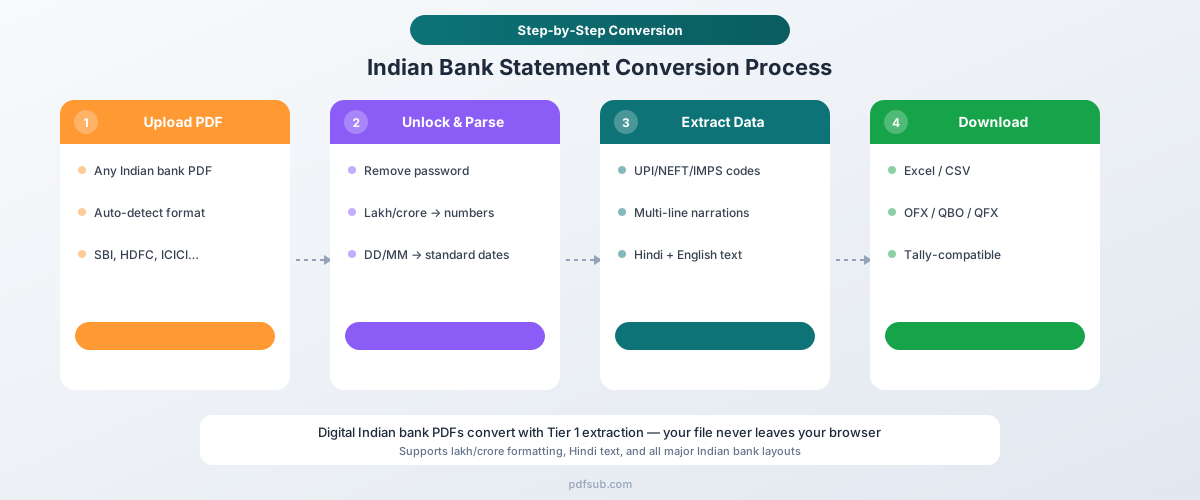
Step 1: Download Your Statement
Log in to your bank's internet banking portal and download the PDF statement. Digital statements are more accurate than scanned passbook pages.
Step 2: Note Your Password
Refer to the password table in this guide for your bank's format. Common patterns:
- Customer ID (HDFC, Canara, IDBI)
- Name abbreviation + DOB (ICICI, Axis, Bank of Baroda)
- Account number (SBI mobile banking, Indian Bank)
Step 3: Upload and Convert
- Go to PDFSub's Bank Statement Converter
- Upload your PDF statement
- Enter the password when prompted
- Select your output format (Excel, CSV, or your accounting software's preferred format)
- Download the converted file
The entire process takes under 30 seconds for most statements. Your file is processed in your browser and never uploaded to any server.
Step 4: Import Into Your Accounting Software
For TallyPrime: Open the Excel file, map columns to Tally's expected fields, export as XML, then import into TallyPrime.
For Zoho Books: Upload the CSV file directly through Banking → Import Statement. Map columns during import.
For QuickBooks: Upload the CSV file through Banking → Upload Transactions. Ensure date format matches DD/MM/YYYY.
Step 5: Verify
Always check:
- Transaction count matches the source PDF
- Opening and closing balances match
- Total debits and credits are correct
- Dates are in the correct month (watch for DD/MM vs. MM/DD interpretation)
Tips for Best Results
Download digital statements. Internet banking PDFs have perfect text encoding, making extraction near-perfect. Scanned passbook pages have lower accuracy due to OCR limitations.
Use the right output format. Excel is best for review and analysis. CSV for most Indian accounting software. XML for TallyPrime.
Check the password format first. Each bank uses a different pattern. Having the password ready before you start saves time.
Verify number formatting in Excel. After import, confirm that amounts are recognized as numbers (right-aligned), not text (left-aligned). If amounts appear as text, select the column and convert to Number format.
Handle multi-account statements carefully. Some banks combine savings and current accounts in one statement. Check that transactions are correctly attributed to each account.
Try It Free
Ready to convert your Indian bank statement? Upload your PDF now - PDFSub supports 20,000+ bank formats including all major Indian banks. Digital statements are processed entirely in your browser. Your financial data never leaves your device.
Start a 7-day free trial. Cancel anytime.